
See delivery in motion, not just tasks in a list.
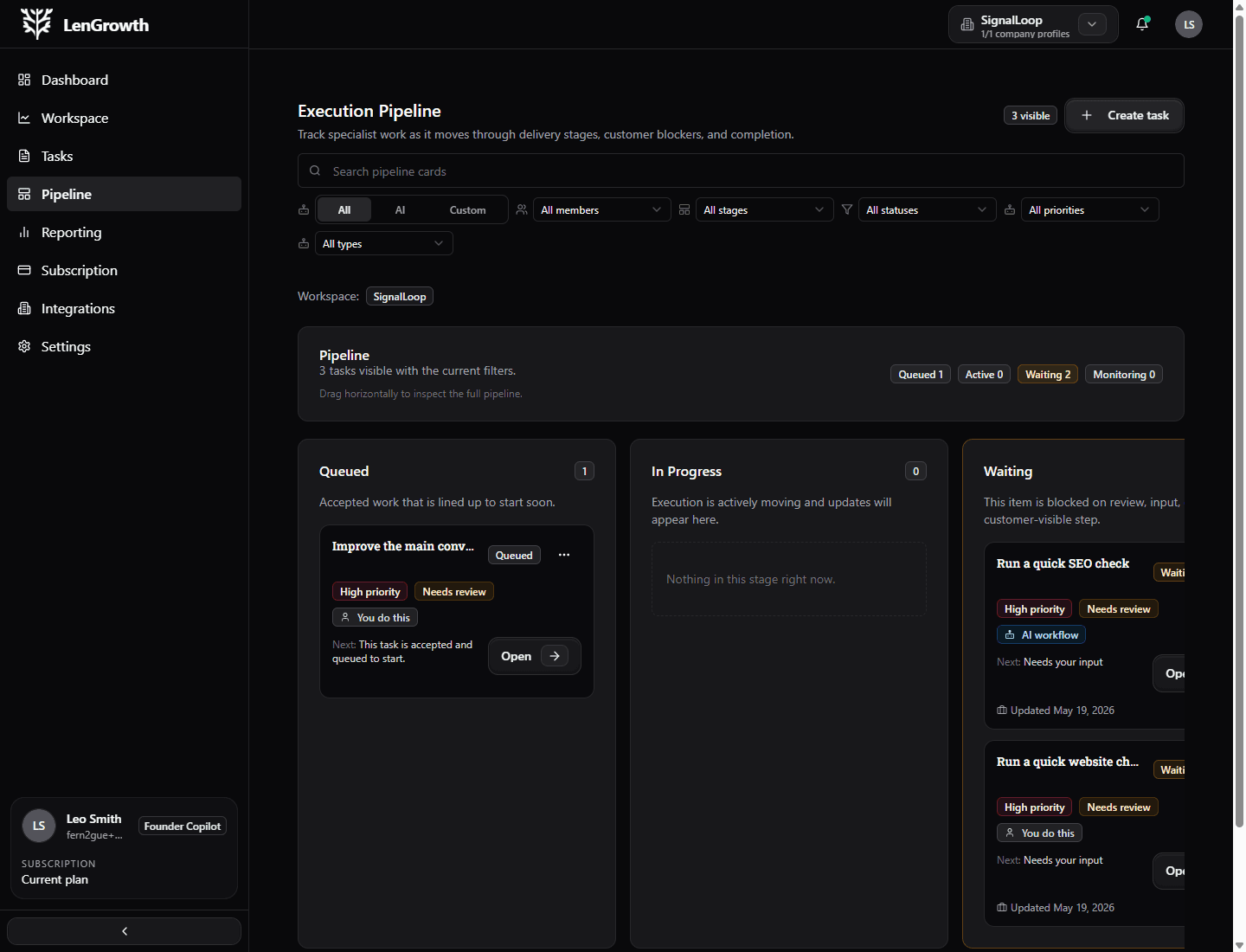
The execution pipeline shows which work is waiting, moving, blocked, being monitored, or done so teams can act before momentum disappears.
Board loop
Delivery becomes easy to read by stage.
The board tells you what is queued, active, waiting, and monitored.
Why the board matters
Status should explain what needs attention.
A pipeline is useful when it helps people read the work quickly. LenGrowth makes the stage, blocker, and next action easier to understand at a glance.
No hidden blockers
Waiting work is visible before it turns into missed momentum.
Shared delivery view
Client input, team work, AI-supported tasks, and specialist work all feed the same workflow.
Faster prioritization
You can tell whether the system needs action, review, follow-up, or patience.
What the board solves
The task list tells you what exists. The pipeline tells you what is happening.
You can see which work is moving, which needs input, and which delivered work is still under observation.
Deep dive
The stage board tells the truth about delivery.
Counts, labels, and blockers make the flow readable without opening every task.
Queued
Accepted work is scoped and lined up, but not actively moving yet.
Active
Execution is in motion and the task should show recent progress.
Waiting
The work needs review, input, access, or a dependency before it can move.
Monitoring
Delivered work is being watched for results, signal changes, or follow-up.
Done
The task is closed with a visible trail of what happened and what was produced.
Source filtering
Views can stay scoped to the right company or context.
Stage counts
Quick counts help you spot bottlenecks without reading every card.
Next-step line
Every stage should make the next action obvious.
Delivery states
Read the work by what is happening now.
The stage model gives teams a shared language for delivery without forcing everyone to inspect every individual task.
01
Queued
Accepted work is scoped and lined up, but not actively moving yet.
02
Active
Execution is in motion and the task should show recent progress.
03
Waiting
The work needs review, input, access, or a dependency before it can move.
04
Monitoring
Delivered work is being watched for results, signal changes, or follow-up.
05
Done
The task is closed with a visible trail of what happened and what was produced.
What users feel
The next move stays visible.
The platform connects context, work, support mode, and proof so the user is not guessing what just happened or what needs attention next.
Hidden blockers show up early.
The view is shared across stakeholders.
Status becomes a signal, not a label.
Why clients like this model
The pipeline keeps execution honest.
Instead of hearing that things are in progress, you can see what is truly moving, what needs your input, and which delivered work is still being monitored for results.
A few things stay constant
The work stays connected to a real objective and is easier to follow from start to finish.
AI helps where it is useful, not where it creates risk.
Specialist support can join without losing the original context.
A few questions clients usually ask.
Read delivery as a system, not as a guess.
When the board shows real stage movement, it becomes much easier to decide what deserves attention now.